How To Change Your Bluesky Handle
To begin with, you can follow me on Bluesky. (Haha, Surprise!)

Nah, it is more than that. I want you to see the final result.
See how my handle is NOT bsky.social below my standing out Asian name?
In fact, look at the link on the page you are reading now. It is intenca.com too! Why? Because a Bluesky handle is a domain name! No idea what a domain is? No problem, that's why I'm here.
In this article, I will guide you through steps-by-steps how to change your Bluesky handle!
Remember, the Bluesky handle IS NOT your display name. See my name is Hong C.T. , but my handle is intenca.com. So, the profile link I share would be https://bsky.app/profile/intenca.com. Just keep that in mind.
Pre-requisite
- $10~$20 in your bank account
- Some basic computer literacy
- Able to follow a basic tutorial
Sounds like you? Well, let's begin!
1. Pick A Handle You Want
How about handsome.dude? Sadly, it can't be done. Remember a Bluesky handle is a domain? Therefore, you can only use a domain ends with something like .com, .co, .org, .net, etc. There are plenty of interesting domains and country code domains. So, you can create a handle like handso.me, because .me is the country code for Montenegro. Or, how about a more visual one like gro.org. (Likely taken.) You'll need to be real creative here!
Just remember, before you decided your handle, you need to check if the domain is available to purchase first! Also, a rarely seen ending domain like .pharmacy is very unlikely to be purchased or might cost you a lot to buy it. Think anything with a .com, it would just cost about $10/year. But if it is say happy.accountants it could cost about $90/year!
2. Check If The Handle (Domain) Is Available
You can use the following tools to check if your domain is available:
Notice how rare domains cost a lot more? Comparing to a regular .com domain is just USD $10 / AUD $15 for a year.

3. Pick A Domain Registration Provider
Before buying a domain, you'll need to pick a domain registration provider. It basically means picking an agent to buy the domain you want. I prefer Cloudflare because they are the largest domain service provider and offer relatively cheap prices (unlike GoDaddy).
However, if you want an exotic domain, Cloudflare might not cover it; you might need Squarespace or others. We will assume Cloudflare for this tutorial, but the steps are universal.
4. Sign Up and Buy!
Easy. Once you have decided on a handle, checked availability, and picked a provider: sign up, enter your details, and buy it! It's straightforward.
Read more at Cloudflare: How to buy a domain | Cloudflare Registrar.
5. Use The Domain As Your Bluesky Handle
Now for the magic. Go to your Bluesky App > Settings > Handle > Press "I have my own domain".
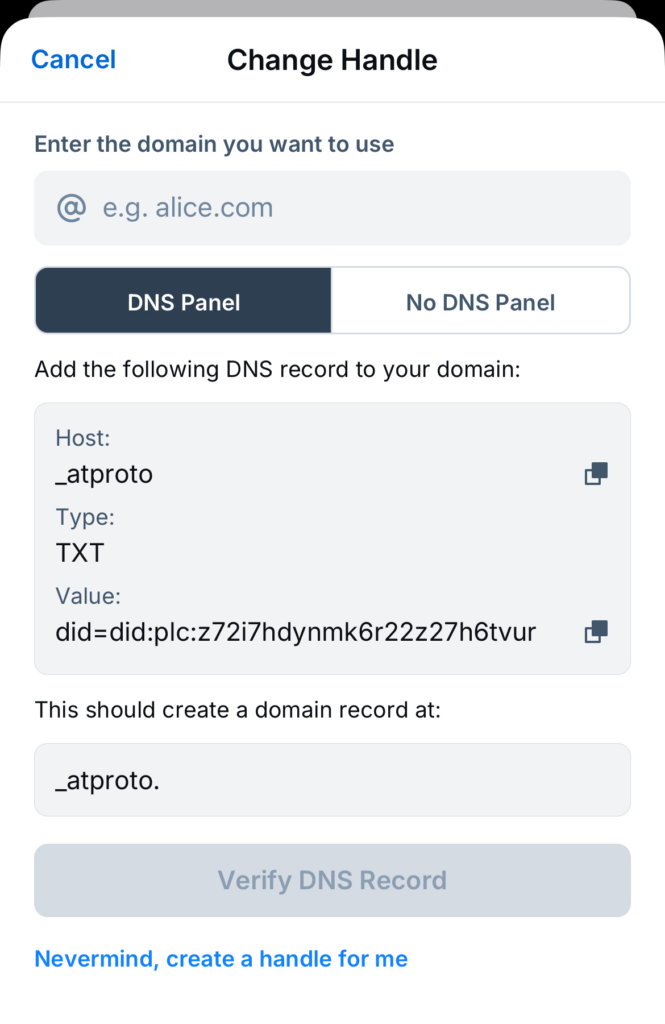
- Type in the domain you've just bought.
- Login to Cloudflare.
- Click on your domain.

- Go to the DNS tab on the left, then press the "Add record" button.

- Enter the info from the Bluesky popup:
- Type: TXT
- Name:
_atproto - Content: Paste the "Value" from Bluesky.

- Hit "Save". Wait one minute.
- Go back to Bluesky and tap "Verify DNS Record".
Having trouble? Read the Official Bluesky Tutorial.
6. That's It! Enjoy!
#Last note To keep a domain, you'll have to renew it once a year.